Star Citizen Download and PC System Requirements
Where to get the game without landing on a fake installer, how much disk space it really eats, and the machine you actually need.
The short answer
There is exactly one place to download Star Citizen: robertsspaceindustries.com. Make a free RSI account, sign in, and click the Download button near your account icon at the top right. That gets you the RSI Launcher — a small installer, well under 200 MB — and the launcher pulls down the game itself. No Steam, no Epic, no console, no third-party client.
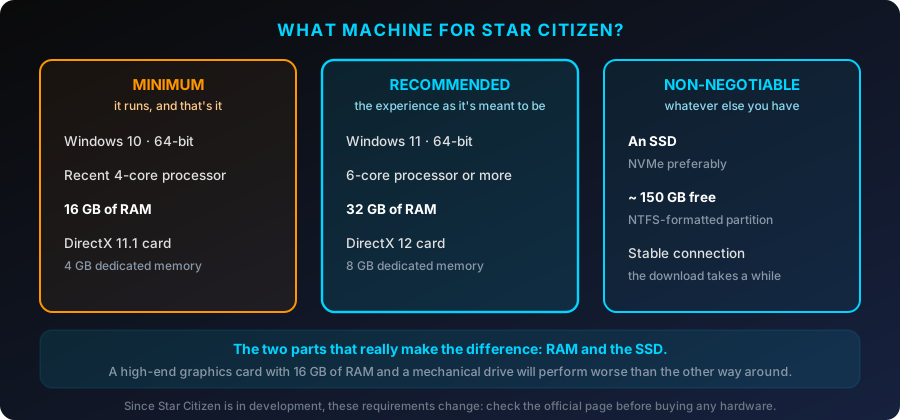
On the hardware side, the published floor is 16 GB of RAM, a 4 GB DirectX 11.1 graphics card, and 150 GB free on an SSD. The number that actually changes your experience is the recommended one: 32 GB of RAM and an NVMe drive.
Where to download Star Citizen
Once you are signed in, the blue Download button sits to the left of your account icon. It hands you the launcher installer, not the game — the launcher manages the download afterward, and lets you switch between the LIVE build and the PTU public test servers once your account has access to them. There is no macOS build and no official Linux build: Star Citizen requires Windows 10 or Windows 11, 64-bit, with the latest service pack.
The game is not sold on Steam or the Epic Games Store, and there is no PS5 or Xbox version. Both of those come up constantly, and the answer has not changed in a decade.
Do you need to buy a game package to download?
Creating an RSI account is free. An email address and a confirmation link, nothing more. It is also the one and only moment the Referral Code field is available to you.
The launcher itself is free to download from that account. What a free account does not get you is a seat on the servers: logging into the persistent universe normally requires a game package, the bundle that pairs game access with a starter ship.
The exception is a Free Fly event. RSI states that during these events no game package is required on the account to log in and play on the Star Citizen Alpha test servers. That is the only way to try the game without spending anything, and it runs several times a year. How it works, and what you can fly, is on the Free Fly page.
Download size, install size, and the disk space to plan for
Two official numbers circulate, and they come from two different pages of the RSI Knowledge Base. Both are worth knowing, because they measure different things.
- The minimum system requirements page asks for 150 GB or more of free space on an SSD.
- The Game and Launcher Requirements page asks for an NTFS-formatted drive with at least 100 GB for the RSI Launcher and Star Citizen, plus at least 10 GB of additional SSD space for the Windows pagefile.
Go with the higher figure: 150 GB free, on an SSD, formatted NTFS. The install itself sits comfortably north of 100 GB and grows with every major patch, and the launcher needs working room to stage an update before it swaps files in. If you fill the drive to the brim, the next patch is the one that fails.
Three details that quietly break installs
- Partition format. An external drive left as exFAT or FAT32 will cause trouble both installing and running. NTFS is not a suggestion here.
- The pagefile. The extra 10 GB is for Windows virtual memory. If you followed some old tuning guide and disabled or capped your pagefile, expect out-of-memory crashes.
- Free space checking. The launcher does not reliably verify that you have enough room before it starts, so a download can run for an hour and then fail. Check the drive yourself.
Star Citizen system requirements
These are the specs Roberts Space Industries publishes. The game is still in alpha, so they move: check the official page before you spend money on parts.
| Component | Minimum | Recommended |
|---|---|---|
| OS | Windows 10 64-bit, latest service pack | Windows 11 64-bit |
| CPU | Quad-core with AVX, AVX2 and FMA3 — Intel i7 Haswell or newer, AMD Excavator or newer | Intel i7 or AMD Ryzen 5 and above; more cores and more cache both help |
| Memory | 16 GB | 32 GB |
| Graphics | DirectX 11.1 capable, 4 GB VRAM | DirectX 12 capable, 8 GB VRAM or more |
| Storage | 150 GB or more free on SSD, NTFS | NVMe SSD, 150 GB free plus headroom |
| Network | Broadband, always required — the game is online only | |
AVX, AVX2 and FMA3: the requirement nobody mentions
Star Citizen needs a CPU that supports the AVX, AVX2 and FMA3 instruction sets. Without them the game does not launch at all, regardless of your graphics card. In practice that rules out Intel chips older than Haswell (2013) and the older AMD FX line. If you are shopping used parts on a budget, check this before anything else — it is the difference between "runs badly" and "does not start."
Graphics drivers and the renderer
RSI asks for a driver supporting Direct3D 11.1 and Vulkan 1.2, and CIG has been shifting the game onto a Vulkan renderer through the 4.x patches. Practical takeaway: keep GPU drivers current, and if a patch leaves you with crashes or visual corruption, the renderer setting in the graphics options is one of the first things worth flipping.
The two components that actually matter
After a couple thousand hours in this game, my view is blunt: the graphics card is rarely what is holding you back. Memory and storage are.
RAM. The 16 GB minimum is a floor, not a target. In Area18, Lorville or New Babbage the game routinely wants close to 20 GB, Windows starts leaning on the pagefile, and the result is the hitching that new players blame on their GPU. Going from 16 GB to 32 GB is the only upgrade whose effect I noticed the same evening I made it.
SSD, ideally NVMe. Star Citizen does not load a level and hand you control — it streams the universe continuously while you play. A slow drive means textures arriving late, geometry popping in during quantum travel, and rough transitions when you drop into a city. A mechanical hard drive is not merely slow here, it is outside the supported spec.
And about the CPU. On the ground in busy areas, per-core speed and cache size decide your frame rate far more than raw GPU horsepower — which is why AMD's large-cache X3D parts have such a strong reputation among Star Citizen players, and why lowering graphics settings so often changes nothing. Splitting a build budget, weight it toward CPU, RAM and storage.
What to build for your target resolution
Component tiers, not frame-rate promises. Server performance varies from session to session, and no amount of hardware fixes a bad shard.
| Resolution | CPU | Graphics | Memory and storage |
|---|---|---|---|
| 1080p | Modern 6 to 8 cores | 8 GB VRAM | 32 GB, SATA SSD acceptable |
| 1440p | 8 cores, high clocks, large cache | 12 GB VRAM | 32 GB, NVMe recommended |
| 4K | High-end, large cache | 16 GB VRAM, DLSS or FSR advised | 32 to 64 GB, fast NVMe |
Common installation problems and documented fixes
Most launcher trouble clears up with a handful of steps that RSI documents. Work through them in this order rather than reinstalling first.
- Launcher stuck "checking for updates," or won't open. Clear the launcher cache from inside the app: click the arrow next to the RSI logo at the top left, open Settings, and under application settings use Clear Launcher Cache. Do this before deleting anything by hand.
- Download stalls, or files look corrupted. Use Verify in the launcher settings. It checks the installation and re-downloads only what is missing or damaged, which is far quicker than starting over.
- Antivirus or firewall interference. A very common cause, and it rarely announces itself. Whitelist the RSI Launcher,
StarCitizen.exe, and the Easy Anti-Cheat installer in your security software rather than turning protection off wholesale. - Error 8001 or 8004. Permission problems in the install folder. RSI's documented fix: close the game and launcher, end any leftover RSI processes in Task Manager, then right-click the launcher, choose Run as administrator and retry. Use it as a targeted fix, not a daily habit — running as admin permanently can leave the launcher writing to a different AppData location than usual.
- Easy Anti-Cheat errors on launch. EAC hooks in at a low level and antivirus tools sometimes quarantine its files mid-launch. Add an exclusion, then let the launcher reinstall the EAC component.
- Crashes, flickering or missing textures right after a patch. Your shader cache is stale. With the game and launcher fully closed, delete the shaders folder under
%LOCALAPPDATA%\Star Citizen. The next session will stutter briefly while it rebuilds — that part is normal. - Settings or keybinds behaving strangely. Delete the
USERfolder inside yourLIVEdirectory, after exporting and backing up your control mappings. - Nothing works. Only then delete the installation completely and let the launcher pull a clean copy — a long download, and a last resort for a reason.
Frequently asked questions
Only from robertsspaceindustries.com. Sign in to your RSI account and use the Download button to get the RSI Launcher, which then installs the game. There is no other legitimate channel: not Steam, not the Epic Games Store, not any third-party download site. A client obtained anywhere else cannot connect to the game servers.
An RSI account is free and the launcher downloads from that account at no cost. Logging into the game servers normally requires a game package, with one exception: during a Free Fly event, Roberts Space Industries states that no game package is required on the account to log in and play on the Star Citizen Alpha test servers.
Plan on 150 GB free on an SSD, on an NTFS partition. RSI's minimum specs page asks for 150 GB or more of free SSD space, while its Game and Launcher Requirements page asks for an NTFS drive with at least 100 GB for the launcher and game, plus at least 10 GB of additional SSD space for the Windows pagefile. Take the higher number and leave room for patches.
16 GB is the published floor, not a comfortable target. In dense landing zones the game fills memory, Windows starts paging to disk, and you feel it as hitching. RSI's recommended configuration is 32 GB, and that is the one upgrade I would not skip.
In cities and other busy areas it is usually CPU, memory and storage bound rather than GPU bound. Per-core speed and CPU cache tend to decide your frame rate on the ground, which is why dropping graphics sliders often barely helps. Server performance also plays a large part, and no hardware can fix that.
No. Roberts Space Industries lists Windows 10 or Windows 11 64-bit as a requirement and does not support macOS or Linux. A community group keeps the game running on Linux through compatibility layers, but that route is unofficial and unsupported by RSI — more on that on the Steam and Linux page.
One thing to settle before you download
You can reinstall the launcher as many times as you like. The referral code works once, entered when you create the account or within the 24 hours that follow. If your RSI account does not exist yet, here is mine — it adds 50,000 UEC to your account, credited when you buy your first game package. Then: what everything costs on the price page, and which ship to start in on choosing a starter ship.