Star Citizen Beginner Guide: Your First Hours in the Verse
You bought a game package, the download finished, and you are lying on a bed in a room with a closed door. Here is the order of operations, the ten keys that actually matter, and the mistakes that end most first sessions.
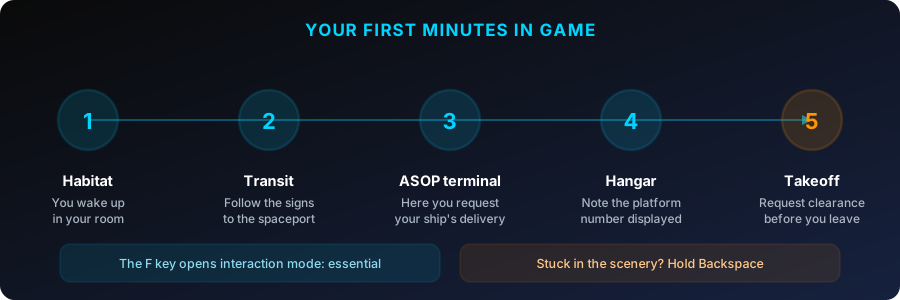
The short answer to "how do I start Star Citizen": hold F to open the door of your hab, ride the elevator down, take the city transit to the spaceport, pull your ship from an ASOP terminal and write down the pad or hangar number it gives you, then press R to power up and N to raise the gear. That is the entire critical path. Everything else — mining, salvage, cargo, org politics — can wait until you have done it once.
The game explains almost none of it. There is no tooltip telling you your ship is a twenty-minute train ride away. I have been backing this project since the 2012 Kickstarter, and the steepest step in Star Citizen is still the first ninety minutes, before you have taken off even once.
Before you launch
Star Citizen comes from exactly one place — the RSI Launcher, downloaded from your account page on robertsspaceindustries.com once you own a game package. Not Steam, not Epic, not console. Start the download the night before, not the evening you plan to play; sizes and system requirements are on the download Star Citizen page.
The one decision that matters before you press Launch is your home city. Character creation asks you to pick a starting location in the Stanton system: Area18 on ArcCorp, Lorville on Hurston, New Babbage on microTech, or Orison on Crusader. That is where you wake up, where your ships are delivered, and where your default respawn point lives. For a first account, take New Babbage or Area18 — shortest walk from hab to spaceport, clearest signage. Lorville is the most confusing city in the game and it is not close.
Waking up: getting out of your hab
You open your eyes in a habitation unit — a bed, a closet, a door. Press I to see what you start with: an undersuit, a mobiGlas, not much else. Note the number on your hab door; you will want to find it again at the end of the session.
From here almost everything runs through one key: F.
- Tap F to interact with whatever is under your crosshair — a door panel, an elevator button, a terminal, an item on the floor.
- Hold F to open interaction mode. Your cursor detaches from the camera and every usable object nearby gets a highlighted marker you can click.
That distinction strands more new players than anything else in the game. If you are standing at an elevator and tapping F does nothing, hold F instead, then click the floor you want. Nine out of ten "I'm stuck in my room" posts on Reddit are this.
Crossing the city to the spaceport
Your ship is not parked outside. Every landing zone is a real city with a real transit network, and you have to ride it:
- Lorville — the Lorville Rapid Transit system runs several lines out of Metro Center. You want the Spaceport line; follow the colored line painted on the floor and wall rather than trying to read the map.
- Area18 — look for the Cityflight Transit entrance near the Plaza. The sky-train runs to the spaceport every couple of minutes.
- New Babbage — the Metro Center under the Commons connects the spaceport, the shops and the Aspire Grand hotel. Shortest run of the four.
- Orison — the platforms are linked by transit cars; the spaceport sits on its own platform, so you are riding whether you like it or not.
Follow the Spaceport signage and the ship pictogram on directional panels. Trains loop on a few-minute wait; board when the doors open, nothing to press. This leg is the longest part of a first session, and that is normal.
Claiming your ship at an ASOP terminal
At the spaceport, look for the ASOP terminals: yellow kiosks, usually in a bank of four or five, in the vehicle operations lobby. They list every ship on your account from anywhere in the system, because ships are account entitlements rather than objects sitting in a parking lot. Interact with F, open the vehicle tab, select your ship, choose Retrieve.
The same terminal is where you store a ship and file an insurance claim. Take the hangar elevator to the number you were given, then find your ship's entry point — ramp, ladder or side hatch depending on the model. Hold F near the hull and the entry markers appear.
The ten keys that matter on day one
Star Citizen has several hundred bindings. Ten get you through a full flight.
| Key | What it does | When you need it |
|---|---|---|
| F | Interact — hold for interaction mode | Doors, elevators, terminals, ship entry |
| F1 | Open the mobiGlas | Contracts, starmap, comms, the map |
| I | Personal inventory | Gearing up before you leave |
| R | Flight ready | Powers and starts everything at once |
| N | Landing gear | Every takeoff and every landing |
| B | NAV mode, then hold to spool the quantum drive | Any trip longer than a few kilometers |
| V / Tab | Scanning mode and ping | Finding wrecks, boxes and contacts |
| C / X | Decoupled mode and space brake | Precise maneuvering, stopping dead |
| U | Master power | Going dark to avoid attention |
| Y | Exit the seat or bed | Getting out of the pilot chair |
Your first takeoff is three inputs: R for flight ready, N to raise the gear, then climb straight up. In an enclosed hangar, request the doors from the hangar panel or your mobiGlas before you lift.
Your first quantum jump is four: B for NAV mode, pick a destination on the starmap, turn until the marker locks, then hold B to spool and jump. If nothing happens, it is almost always alignment — close to the marker but not locked onto it.
Landing back home has one step people skip: hail ATC for clearance before you approach, from your ship's comms panel or the contacts app in the mobiGlas. Descending onto a pad without it gets you fined, and at some locations shot at by station defenses.
This is the point where a referral code stops being an abstraction. The 50,000 UEC credited when you sign up cover the boring part of the early game: an armor set, a rifle that is not the starting pistol, a stack of medpens, spare oxygen. Because they sit on your account rather than your character, they survive alpha wipes — unlike the aUEC you earn playing, which get reset. The one rule to know is the deadline: the code goes in when you create the account, or within 24 hours, and nobody at RSI support can add it afterward. If you have not made your account yet, do that part first.
Your first paying missions
Everything starts in the Contract Manager in your mobiGlas (F1). Three families work with a starter ship and no gear:
- Delivery contracts. Pick up a box, drop it somewhere else. No combat, no risk, roughly 3,000–15,000 aUEC depending on distance, and they teach you the navigation loop while paying you. Accept three or four that share a route rather than one at a time.
- Investigation contracts. Same shape with a bit of exploration and a story attached. Good second step.
- Bunkers. Ground combat against NPCs. Riskier, and the first one will probably kill you, but a cleared one- or two-skull bunker pays in the tens of thousands of aUEC and you keep the armor and weapons you pick up off the floor. This is how most new players get properly equipped.
For bounties, stay on VLRT and LRT tiers — an Aurora or a Mustang Alpha handles those. HRT and ERT expect a real combat ship and will simply delete you. Hauling is the other reliable earner, but start on Extra Small and Small contracts: starter ships carry only a few SCU, and accepting a job bigger than your hold is the classic way to waste forty minutes.
A realistic target for a first evening is 100,000 to 200,000 aUEC — enough to gear up properly and stop worrying about dying.
Set your respawn point before anything goes wrong
Almost no beginner guide mentions this, and it changes your whole first week. By default you respawn at the hospital in the home city you picked at character creation. You can move it: lie on a medical bed at any clinic, hospital or ship medbay and set it as your regeneration point. Do that wherever you are actually operating, and death costs a two-minute walk instead of a cross-system flight home.
The mistakes that end most first sessions
Leaving without life support gear. Plenty of contracts end in vacuum or an unbreathable atmosphere, and oxygen is measured in minutes. Check your suit and carry a spare oxygen source before any mission with "derelict" in the name.
Assuming death wipes you out. It does not. You respawn wearing your equipped gear — armor, equipped weapon, magazines, medpens. What was in your backpack stays on the corpse and can be looted by whoever finds it. Die inside a landing zone and you keep your inventory too. The rule: never put something in a backpack you would be upset to lose.
Panicking when the ship explodes. File a claim at any ASOP terminal. A starter ship is back in a couple of minutes; large hulls take considerably longer. Since the Alpha 4.8 insurance rework you also choose between the factory-standard configuration and a custom loadout you registered at an ASOP terminal — so if you ever buy upgraded components, register the loadout before you fly. With an Aurora or a Mustang, it is a non-issue.
Shooting inside an armistice zone. Firing a weapon in a protected area — by accident, at an NPC, it does not matter — gives you a CrimeStat. As it climbs, security turrets engage you, landing rights get pulled and bounty hunters get a contract on you. Pay small fines at a station admin terminal instead of letting them escalate.
Blaming yourself for bugs. Star Citizen is an alpha — the live branch is Alpha 4.9 as of summer 2026, and it shipped as a stability patch precisely because there was that much to fix. Falling through the floor, an elevator that never arrives, a ship that will not spawn: known defects, not your piloting.
Logging off wherever you happen to be. The most expensive habit there is. Store the ship at an ASOP terminal, move valuables into a local inventory or your personal hangar, then log out from a hab bed. Quitting mid-flight in deep space is how people lose a full cargo hold.
What to do when you get stuck
In order, least destructive first:
- Force a respawn by holding Backspace. Your character dies and regenerates at your respawn point. Blunt, but the standard fix for being trapped in geometry.
- Log out and back in. For elevators that never arrive, hangar doors that will not open and ships that refuse to appear, a full relog to the main menu fixes it more often than anything else — and some stuck states ignore forced respawn entirely.
- File a claim at an ASOP terminal if the ship is genuinely destroyed, welded into a hangar door or unresponsive.
- Wait out a 30k. Error code 30000 means you lost the connection to the game server, usually because that server crashed — not your internet. Do not reconnect instantly: close the client, give it ten minutes, let a fresh server come up. And when you get back in, if your ship shows "Claim" instead of "Retrieve" at the ASOP terminal, do not claim it. The server has not finished recovering its state. Wait another five or ten minutes and look again.
- Character Repair, last. RSI's support site has a Character Repair tool that resets the data attached to your avatar. It genuinely is a last resort: it cannot be undone, it sends you back to your spawn point and it unequips everything into your inventory. Try the four steps above first.
Beyond that: Spectrum and the Issue Council are linked from the RSI site, the community-run Star Citizen Wiki is the best patch-accurate English reference, and r/starcitizen answers "is this a bug or am I dumb" within minutes. Most orgs take brand new players with zero hours, and flying with someone for a week is worth more than any guide, including this one.
Still choosing between packages? The best starter ship comparison covers Aurora versus Mustang, and the Free Fly guide explains how to try all of this before spending anything.
Frequently asked questions
Plan for at least two hours. Getting out of your hab, crossing the city, pulling your ship from an ASOP terminal, taking off, running one mission and landing again takes real time when every interface is new. A twenty-minute session ends with you still on the landing pad, which is the fastest way to decide the game is impenetrable.
No. Deliveries, investigation contracts and low-tier bounties all work fine solo. But for the first week, a voice channel saves an enormous amount of time: somebody explains in thirty seconds what the game explains nowhere, and comes to pick you up when you are stranded on the wrong side of Stanton. Plenty of orgs recruit brand new players with no hour requirement, membership is free, and you can leave at any time.
No. Mouse and keyboard is the default, it is fully competitive, and it is by far the easiest way to learn. A HOTAS is more comfortable on long flights and more fun in a dogfight, but it is a purchase to consider months in, not before your first takeoff. A basic gamepad also works if that is what you already own.
Less than you think. You respawn wearing the gear you had equipped — armor, equipped weapon, magazines, medpens. What was stowed in your backpack stays on your corpse and can be looted by other players. If you die inside a landing zone, you keep your inventory too. Your ships are never lost: they are account entitlements, not objects you can misplace.
At any ASOP terminal, find the ship in the list and file a claim. There is a wait that scales with hull size — a starter ship is back in a couple of minutes. If the ship is missing from the list entirely rather than destroyed, log out fully and log back in first; a desynced session is the usual cause, and claiming a ship the server still thinks exists only makes it worse.
Yes, in one specific way: the 50,000 UEC land on your account rather than your character, so they survive alpha wipes, unlike the aUEC you earn in game. That covers armor, a decent weapon and a medical supply of medpens without grinding for them first. The catch is timing — the code has to be entered when you create the account or within 24 hours, and there is no way to add it later.